
About this case study
This is an opinionated guide to choosing tools, not a benchmark, a ranking, or a reported customer result.
Job one: the launch moment
Most tool roundups are lists of brands, which is not how you actually spend a week. You have jobs to do: get seen on launch day, publish something every week afterwards, show up where your users already talk, keep a list of people who asked to hear from you, and know what worked. This guide is organised by those five jobs. Pick one tool per job, and only where a tool genuinely beats doing the thing by hand.
The first job is the launch itself. In 2026 you can ship a working app with Lovable, Bolt, Cursor, v0 or Replit in a few days, which means launch day arrives long before you have an audience. Product Hunt is still the default place to spend it: it concentrates a crowd of people who like trying new products into a single 24-hour window, and the traffic is real even when it is short-lived. Hacker News, with a Show HN post, is the other free option worth preparing properly.
Under those two sits a long tail of directories — general software directories, alternative-to listings, AI and indie app catalogues, and niche lists for your specific category. None of them is exciting on its own. Together they build backlinks and a slow trickle of search traffic that keeps arriving months later. The only tool you need here is a spreadsheet with a row per directory, the submission URL, the date you submitted, and the status.
Do not buy anything for this job. Launch platforms are free to use and expensive in preparation time: the asset that decides how launch day goes is your first comment, your demo video, and the twenty people you told beforehand, not a piece of software.
Job three: communities, and why no tool does this for you
Reddit, Discord servers, and Indie Hackers are where a lot of early users actually come from, and they are the one part of the stack you should keep entirely manual. Every automation product that has promised to solve community participation has ended up producing replies that read like automation, which is worse than silence. Amplispect does not post to Reddit and does not search it — that work is yours.
What you need instead is a rule you can keep. Two communities, not eight. One useful comment a day in each, made from an account with real history, where the comment answers the question even if the reader never clicks anything. A link belongs in a reply only when it is genuinely the best answer available, and most days it is not.
The only tooling worth having here is a bookmark folder, a saved search for the phrases your users use to describe their problem, and a recurring calendar block. If you want a place to record what you learned each week, use the same document you use for everything else. Do not buy a community management platform for a solo app.
Jobs four and five: email and knowing what worked
Email is the only channel you own outright, which is why it is worth starting before you feel ready. At your stage the requirement is small: one list, a signup box on the landing page, and one honest update a month describing what changed and what you are working on. Any simple newsletter tool with a free tier does that job, and most of them do it identically at low volume.
What you should not do is buy a marketing automation suite. Drip sequences, lead scoring, and behavioural triggers are solving a problem you do not have yet, and the setup cost is paid in the weeks you should have spent talking to users. Pick the tool with the least configuration and move on; migrating a list of 300 people later takes an afternoon.
For measurement, two views are enough. Site analytics — any lightweight, privacy-friendly option — tells you how many people arrived, from where, and whether they signed up. Tag the links you post so a directory listing and an Instagram post do not both collapse into “direct”. That is the outside view.
The inside view comes from your publishing tool. Reach, engagement, and comments per post tell you which topics and formats are worth repeating, which is a different question from how many people converted. In Amplispect that performance view feeds the next generated week, so the loop closes without you building a spreadsheet. Whatever tool you use, look at both views once a week, at the same time, and change one thing.
The minimal stack for one founder
If your budget is under roughly $30 a month and you have one evening a week for distribution, this is the whole stack. Most lines are free; check current pricing yourself, because it moves.
- Launch: a Product Hunt account prepared weeks in advance, a Show HN draft, and a spreadsheet of directories with a submission date per row.
- Publishing: one scheduler, and the only line item worth paying for. Choose by whether you arrive with posts written or need the week planned for you.
- Community: two accounts you use by hand — one subreddit and one Discord or Indie Hackers — with a daily fifteen-minute block in the calendar.
- Email: one free-tier newsletter tool, one list, one signup box, one update a month.
- Analytics: lightweight site analytics with tagged links, plus the performance view inside your publishing tool.
- Nothing else until a specific week is blocked by not having it. Add tools to remove a bottleneck you have felt, never to feel prepared.
What this stack realistically buys you
A launch day you did not improvise, posts going out every week without a Monday decision, two communities where your name is familiar, a small list that opens your updates, and one weekly number you can act on. It does not buy users. It buys the consistency that makes users possible, which is the part most indie apps never reach.
The trap to avoid
Choosing tools feels like progress and costs nothing to keep doing. Give yourself one evening to decide, then publish for a month before changing anything. And never let a tool post to communities or reply to comments unreviewed — accounts get limited for it, and a bad automated reply in public is harder to undo than a slow one.
Go deeper
Where to go next, depending on which job you are stuck on:
- Typefully vs Amplispect for Build-in-Public FoundersA closer comparison of the two publishing approaches for founders building in public.
- How to Distribute an App: The Complete Guide for Founders Who Have Built SomethingThe full distribution guide these tools plug into, from first users to a repeatable weekly loop.
- App Marketing for Developers Who Hate MarketingFor when the problem is not the tool but the fact that marketing feels like someone else’s job.
- Product Hunt Launch Checklist for Indie Apps (2026)The preparation that decides how launch day goes, step by step.
- Amplispect compared with other schedulersSide-by-side detail on where Amplispect fits against other publishing tools.
- The Amplispect schedulerPer-network previews, validation, and per-destination publish status for Instagram, Threads, and X.
Frequently asked questions
What tools do indie hackers use to market an app in 2026?
Most working stacks are small: a launch platform such as Product Hunt, one social scheduler, one or two communities used manually, a free newsletter tool, and lightweight site analytics. The specific brands matter less than covering each job once and keeping the stack small enough to actually run.
What is the cheapest marketing stack for a solo founder?
Launch platforms, directories, communities, and most newsletter tools have free tiers, and several site analytics tools are free at low traffic. In practice the only line you need to pay for is publishing, which keeps a workable stack under about $30 a month.
Is Amplispect an alternative to Typefully or Buffer?
It overlaps with both but starts from a different place. Typefully and Buffer give you a queue for posts you have already written; Amplispect reads your website and generates a planned week you review once, then publishes it to Instagram, Threads, and X. Choose by whether your bottleneck is scheduling or deciding what to post.
Do I need a separate analytics tool for social media?
Usually not. Your publishing tool should show reach, engagement, and comments per post, which covers what to publish next. Pair it with site analytics and tagged links to see which channels actually send traffic, and stop there until a specific question needs more.
Job two: publishing every week without a content team
This is the job that quietly ends most indie apps. Launch day is one day. The forty weeks after it are when distribution either compounds or stops, and they are also the weeks when nobody is watching, the product still needs work, and writing a post feels like the least urgent thing you could do. A tool earns its place here if it reduces the number of decisions you have to make on a Monday morning.
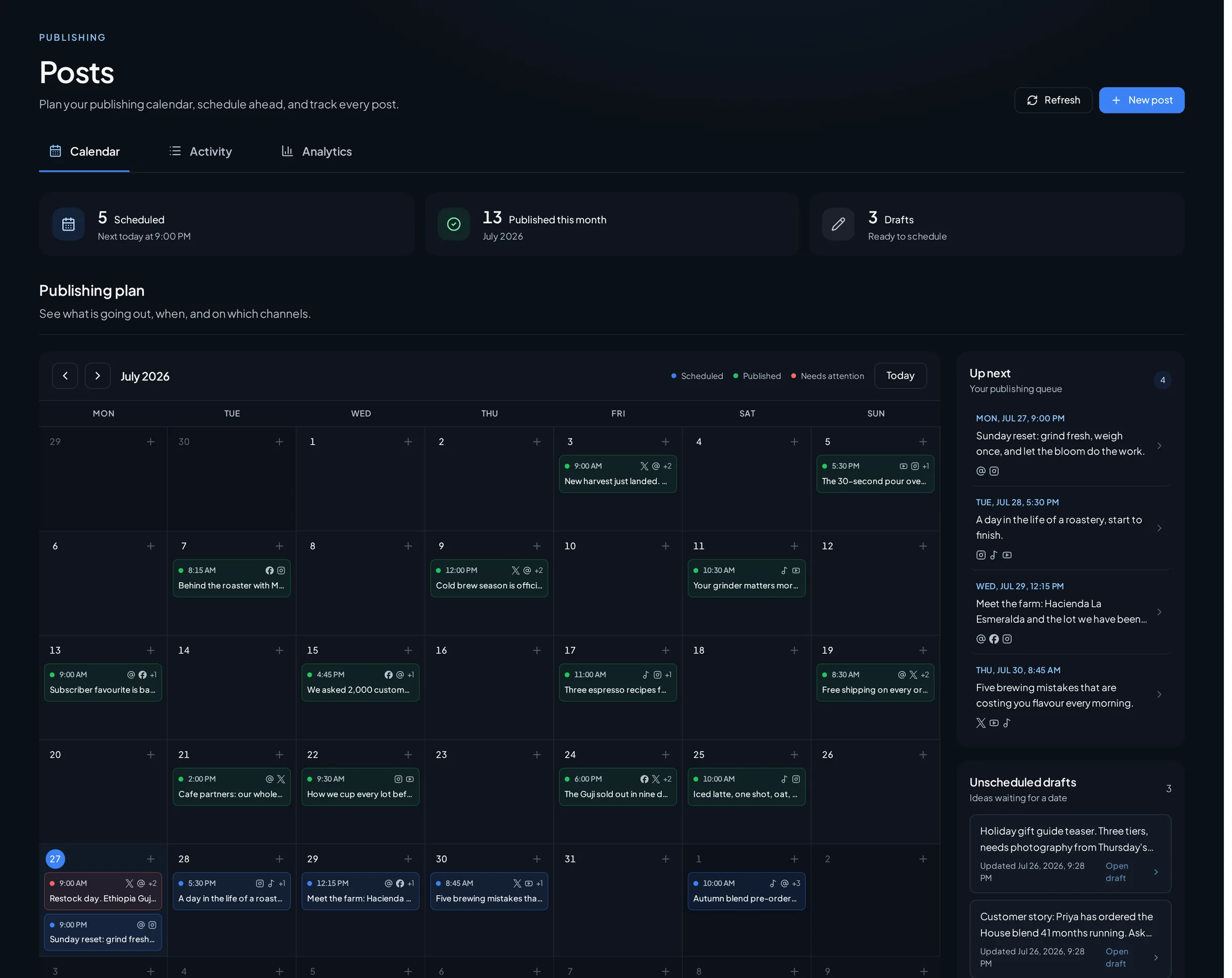
Amplispect is built for that specific case. It reads your website to set up a workspace with your offer, your audience, and your brand voice, then generates a full week of planned posts on a cadence you set — each one with a role, a date, and a rendered design from your brand templates. You review the week in one sitting, edit or delete anything you do not like, and the composer shows a per-network preview with validation before anything is queued. Published posts feed a performance view, and the next generated week starts from what actually performed rather than a blank page. It publishes to Instagram, Threads, and X, and nothing goes out without your review. If you want the week planned for you and reviewed once, that is the trade it makes; if you want a blank editor and full manual control over every post, it is the wrong shape.
Typefully is the tool to look at if your distribution is mostly writing. It grew up around X threads and has since added other text-first networks, and its drafting experience is deliberately quiet — you write, schedule, and get out. Founders who enjoy writing and already have a build-in-public voice tend to be happy there, because the tool assumes you arrive with something to say.
Buffer is the long-standing generalist. It has been scheduling posts for well over a decade, supports a broad list of networks, and is well documented and predictable. If your plan requires a network outside Instagram, Threads and X, breadth of coverage is the honest reason to choose it.
The choosing question is not which tool has more features. It is: do you arrive on Monday with posts already written? If yes, a queue is enough, and Typefully or Buffer will serve you for years. If you arrive with nothing and lose the week to that, you want the week generated and reviewed instead of composed from scratch.