
About this case study
This guide describes a repeatable extraction process, not a reported customer result or a promise about reach.
Your landing page is already a content brief
In 2026 the build is the fast part. You assemble an app over a few evenings with Lovable, Bolt, Cursor, v0 or Replit, you ship a landing page, and then the part nobody warned you about begins: an empty calendar and a blinking cursor. Most founders assume the problem is a shortage of ideas. It is not. You already wrote the ideas down, on the page you spent three weeks polishing.
A landing page that converts has to do five jobs, and each job is a content source. The hero states the promise. The section under it states the problem in the reader’s own language. The feature list explains the mechanism. The FAQ answers the objections that stop people from signing up. The testimonials and the small print carry the proof. On top of all that, the page is the only written record of your voice: the words you picked when you were genuinely trying to be understood.
So the extraction is mechanical rather than creative. Five posts from the hero promise, six from the problem statements, eight from the features rewritten as outcomes, six from the FAQ objections, five from proof and behind-the-scenes. That is thirty posts, which is a month at one a day or six weeks at five a week. You will repeat yourself, and that is correct: almost nobody sees every post you publish.
The hero and the problem: 11 posts
Start at the top of the page. The hero holds the promise, and the section under it holds the reason anyone should care about the promise.
- Hero — Post the headline on its own, with one line on who it is for and one on who it is not for.
- Hero — Rewrite the headline three ways and publish the version you almost shipped, plus why you cut it.
- Hero — Turn the subheadline into a before and after: the day before your product, the day after.
- Hero — Screen-record the exact flow the hero promises. Ten seconds, no voiceover, caption is the promise.
- Hero — Explain the one word in your headline that people misread, and what you actually mean by it.
- Problem — State the problem in the words a real user typed in a support message, then say what you built.
- Problem — Post the workaround people use today, a spreadsheet or a group chat, and the point where it breaks.
- Problem — Put a cost on the problem in hours or money per week, using numbers you can defend.
- Problem — Ask which version of the problem your readers have, and treat the replies as research.
- Problem — Describe the moment you hit this problem yourself, including what you tried before building.
- Problem — List three symptoms people never connect back to the same root cause.
Features, objections and proof: the other 19 posts
Everything below the fold is denser than it looks. Features become outcomes, the FAQ becomes objection handling, and the parts you almost deleted become proof.
- Feature — Take one feature and post only the outcome: what a user stops doing this week.
- Feature — Show the feature in three screenshots, first, middle, done, with no arrows or annotations.
- Feature — Compare the manual version step by step with the version your product does in one step.
- Feature — Post the smallest feature you almost cut, and the request that saved it.
- Feature — Pair two features into a workflow and post the workflow, not the features.
- Feature — Answer why the feature exists at all for the one people ask about most.
- Feature — Show the default settings and explain the opinion behind each one.
- Feature — Post a use case you did not design for but users found anyway, and say who it fits.
- Objection — Answer the pricing question directly, including who should not be paying for this yet.
- Objection — Take the can-I-just-use-a-spreadsheet question and answer it honestly, with the line where it stops working.
- Objection — Post the setup question and the real time it takes, measured on a stopwatch rather than estimated.
- Objection — Address the trust question: where data lives, what you can see, what you cannot.
- Objection — Answer how this differs from the obvious alternative without misrepresenting anyone.
- Objection — Answer the question you keep getting in DMs that is not on the page yet, then add it to the page.
- Proof — Post one testimonial sentence with the context around it instead of the star rating.
- Proof — Share a number you can verify from your own dashboard, clearly labelled as your data.
- Proof — Show what broke last week and how you fixed it.
- Proof — Photograph the notebook, whiteboard or messy tab where the feature was actually designed.
- Proof — Publish the roadmap item you are building now and ask which one should come next.
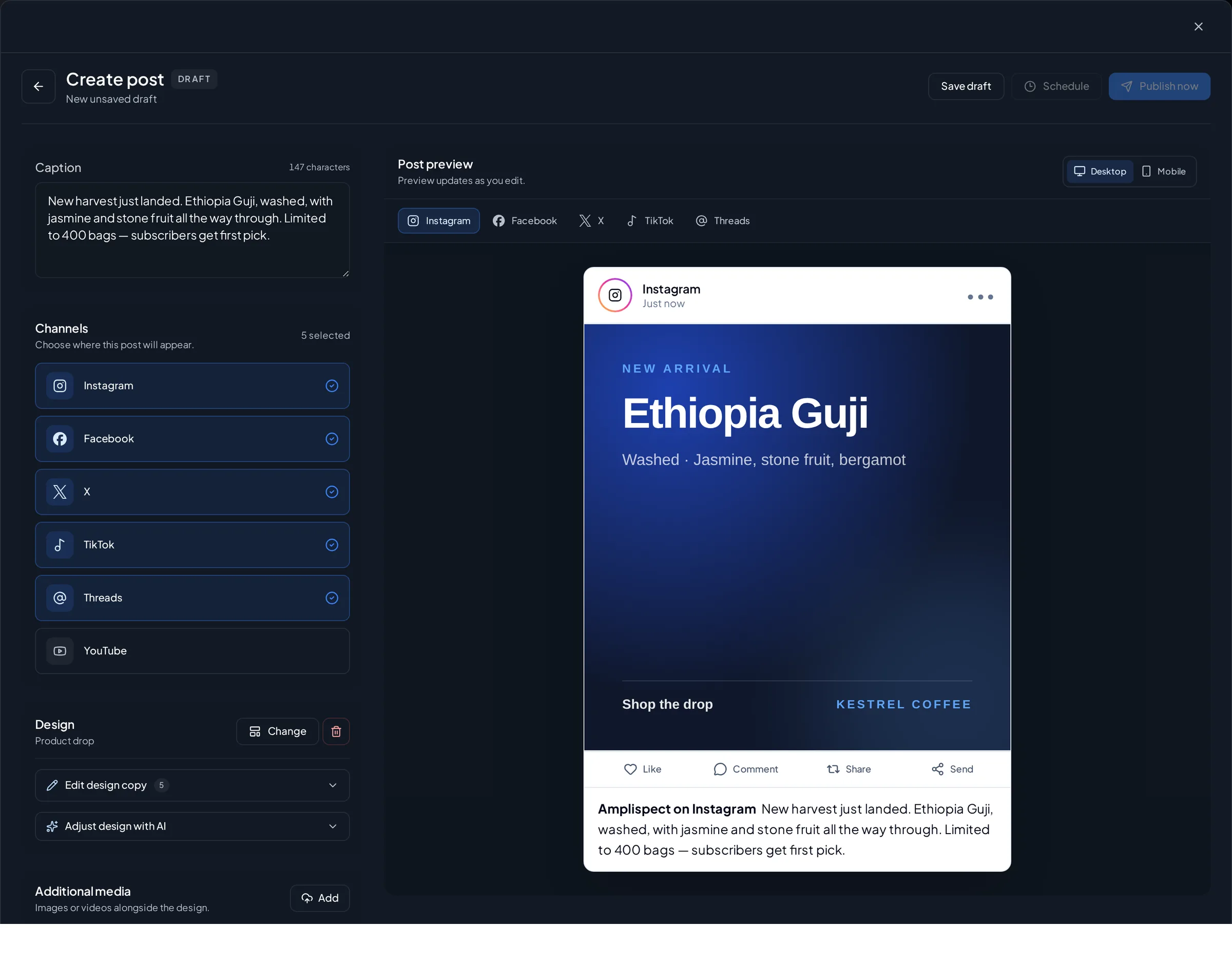
Doing it in Amplispect instead of a document
You can run this whole method in a text file. The reason to run it in Amplispect is that the extraction stops being a one-off afternoon. You paste the landing page URL and the workspace is created from the page itself: the offer, who it is for, and the brand voice are read off your own copy instead of typed into another empty form.
Then spend ten minutes correcting what came back. This is the highest-leverage step in the process. If the audience reads as “small businesses” and your users are actually solo iOS developers, fix that sentence now, because every post generated afterwards inherits it.
With the context confirmed, generate the first week. You get planned posts on a cadence you choose, each with a role and a date, ready for Instagram, Threads and X, which are the three networks Amplispect publishes to today. Open each draft in the composer, cut anything that sounds like a brochure, check the per-network preview and validation, then schedule. Nothing goes out without you approving it.
After that, repeat weekly instead of dumping thirty posts into a queue on day one. Two weeks in, the performance view shows which of the five sources is actually earning attention, often the objection posts and sometimes the behind-the-scenes ones, and that feeds the next generated week. The landing page gave you the raw material; the weekly loop is what turns it into a habit.
If the extraction comes back vague, fix the page first
Nothing can read what is not written. When the drafts come back generic, the page is generic. Work through this list before blaming the generator:
- Replace the abstract headline with the concrete thing the product does, inside the first six words.
- Name the user on the page: their role, the tool they use today, the size of their team.
- Write the problem in one sentence, in the user’s words, above the feature list.
- Rewrite every feature name as a feature outcome: this, so you stop doing that.
- Add an FAQ with the four questions you actually get, including the price objection.
- Put one piece of real proof on the page: a quote with a name, a number with a source, a screenshot with real data.
- Delete the two paragraphs of filler that exist only for search engines. They teach the extraction to sound like nobody.
- Say what the product does not do. The boundary is often the sharpest post you will write all month.
What a realistic month looks like
One page, roughly two hours to extract the thirty angles and confirm the workspace context, then a twenty-minute review before each week goes out. At the end of the month you have a month of published posts and, more usefully, evidence of which of the five sources deserves more of your time. Reach, sign-ups and downloads stay outcomes you measure, not results this process can promise.
The repurposing guardrail
Repurposing is not republishing. Do not paste the same paragraph into three networks and call it a week: Threads takes a conversational fragment, X rewards one sharp line, Instagram needs the visual to carry the point. And never let a draft claim something your page cannot back, whether that is an invented metric, an integration you have not shipped, or a customer quote that does not exist. You review every post before it publishes.
Go deeper
Where to go once the page has been drained.
- Your First 10 Posts About Your App When You Have No Users or TestimonialsThe starting sequence, if you would rather begin with ten posts than thirty.
- How to Write a Changelog That Brings Users Back (and Attracts New Ones)Where the next thirty posts come from once the landing page is used up.
- App Marketing for Developers Who Hate MarketingA distribution routine for people who would rather be writing code.
- Content Marketing Strategy for Your AppThe longer view: turning scattered posts into a content strategy for your app.
- How to Distribute an App: The Complete Guide for Founders Who Have Built SomethingThe pillar guide to every distribution motion available after you ship.
- Website to social postsSee how a workspace is built from your landing page URL.
- AI content calendar generatorSee how a week of planned posts is generated on the cadence you set.
Frequently asked questions
How do I turn my website into social media posts?
Read the page as five content sources: the hero promise, the problem statements, the features rewritten as outcomes, the FAQ objections, and the proof. Each source produces a handful of posts. Amplispect can create the workspace directly from the URL and generate the first week from that extracted context.
How many social posts can one landing page produce?
Thirty is a realistic first pass for a normal page: five from the hero, six from the problem, eight from the features, six from the FAQ, five from proof and behind-the-scenes. A thin page produces fewer, which is usually a signal that the page itself needs work.
Does repurposing landing page content sound repetitive?
It repeats on purpose, and that is fine, because almost nobody sees every post you publish. It only reads as repetitive when you copy sentences instead of ideas, or use the same format twice in a row. Change the angle and the format, keep the message.
Which networks can Amplispect publish these posts to?
Instagram, Threads and X are the live publishing channels, each with its own preview, validation and publish status. Anything you want to put on LinkedIn, TikTok or Reddit stays manual work you do yourself.